Customer Story

Fort Community Credit Union Eliminates Tribal Knowledge Across 5 Branches With Trusted SOPs

Learn how Fort Community CU centralized SOPs, reduced cross-branch confusion, and gave employees trusted answers in the moment of need.

  • TL;DR

Fort Community Credit Union

The short version (TL;DR)

Company: Fort Community Credit Union

Challenge: Employees relied on experienced coworkers to answer questions and solve problems, making it difficult for team members to build confidence and consistency.

Solution: Centralized existing procedures in ScreenSteps, optimized them for real-time use, filled documentation gaps, and introduced Sidekick to deliver answers directly within employee workflows.

Results: Employees are able to self-serve for answers, branches operate from the same playbook, and members receive the same consistent service, no matter whom they talk to.

Fort Community Credit Union
left-chevron-2 left-chevron-2 copy

The short version (TL;DR)

The Company

Fort Community Credit Union

The Challenge

Employees relied on experienced coworkers to answer questions and solve problems, making it difficult for team members to build confidence and consistency.

The Solution

Centralized existing procedures in ScreenSteps, optimized them for real-time use, filled documentation gaps, and introduced Sidekick to deliver answers directly within employee workflows.

The Results

Employees are able to self-serve for answers, branches operate from the same playbook, and members receive the same consistent service, no matter who they talk to.

“We wanted to find a way for our team to quickly access answers instead of relying on the tribal knowledge of seasoned team members. ScreenSteps helps us ensure instructions are consistent and team members always have a resource that is available to help them with answers and procedures.”

Jennifer Tucker
Training Coordinator, Fort Community Credit Union

The Company

Fort Community Credit Union

Fort Community Credit Union operates five branches with 73 employees. As the organization grew, employees often relied on experienced coworkers to answer questions about standard operating procedures and member requests.

Two coworkers trying to resolve a problem

The Challenge

Team Members Relying on Tribal Knowledge

When something unfamiliar came up at a branch, the quickest solution was often to call someone who had done it before.

While most procedures were already written down, they weren’t easy to find or follow in the moment of need. Employees relied on tribal knowledge instead of documented guidance. Managers and subject matter experts were frequently pulled away from their work to answer routine questions

Fort Community wanted to shift that behavior.

Instead of relying on the same few people for answers, employees needed a reliable place to quickly find the information themselves.

Two coworkers trying to resolve a problem

“We needed training to be the same across the board, and we needed people to be able to find answers quickly while they’re helping a member.”

Jennifer Tucker
Training Coordinator, Fort Community Credit Union

The Solution

Centralize, Optimize, and Deliver Guidance in the Moment

To reduce dependency on tribal knowledge, Fort Community Credit Union implemented ScreenSteps as a single source of truth for policies and procedures.


ScreenSteps Knowledge Capture

Step 1

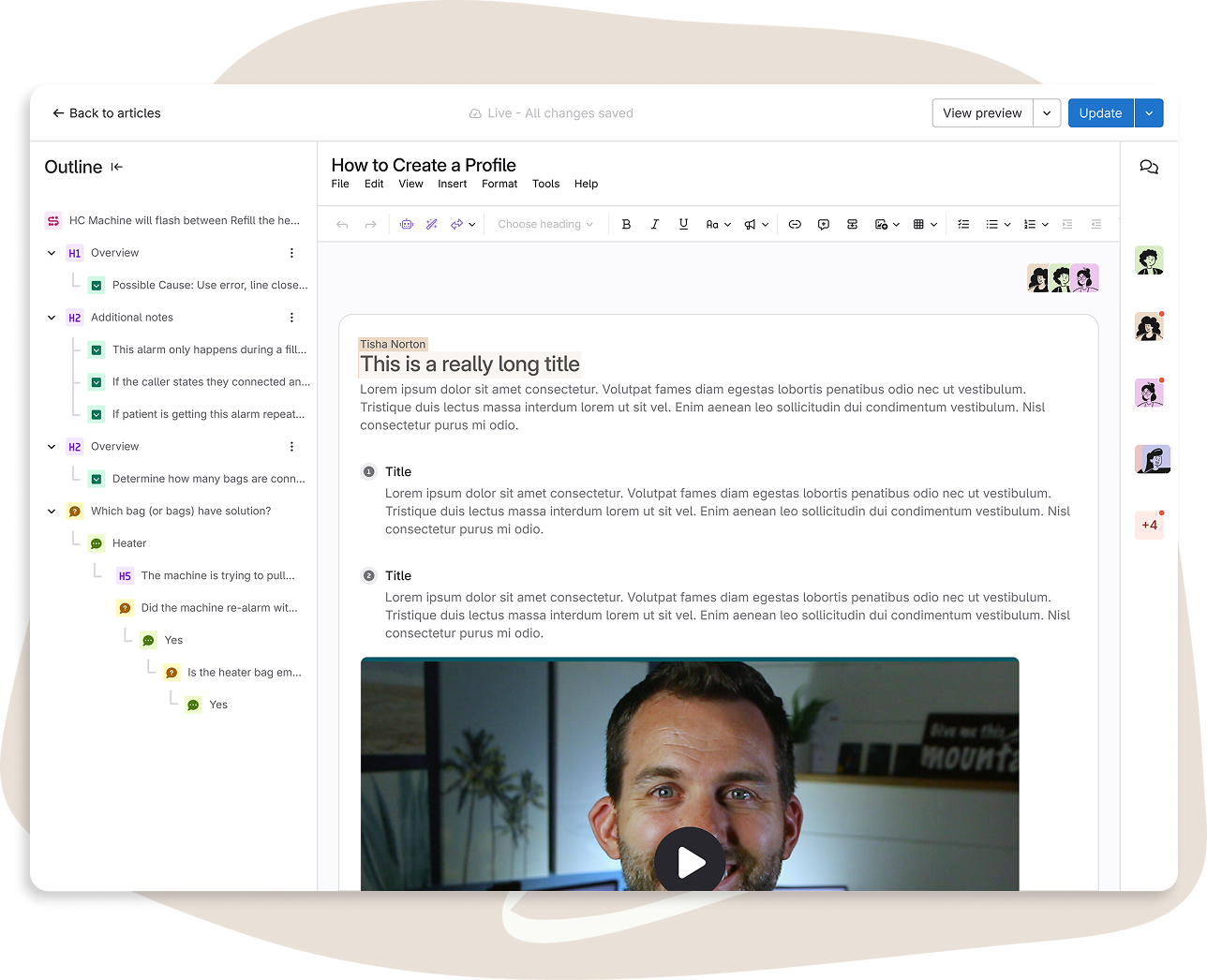
Centralized their SOPs into a single, searchable source of truth

Approximately 75% of their procedures were already documented. By bringing them into ScreenSteps, employees could quickly search and find the guidance they needed in one place.

ScreenSteps Knowledge Capture
Optimizing SOPs with AI in ScreenSteps

Step 2

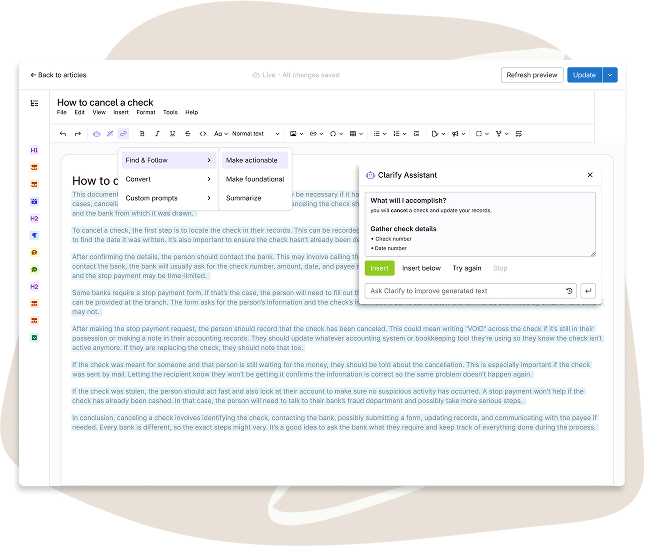
Optimized existing procedures and filled documentation gaps

As teams worked through their processes, they optimized SOPs to make them easier to find, follow, and apply in real time. They also created new procedures where gaps existed.

Instead of relying on memory or informal explanations, knowledge was documented and accessible to everyone.

Optimizing SOPs with AI in ScreenSteps
ScreenSteps Sidekick Browser Extension

Step 3

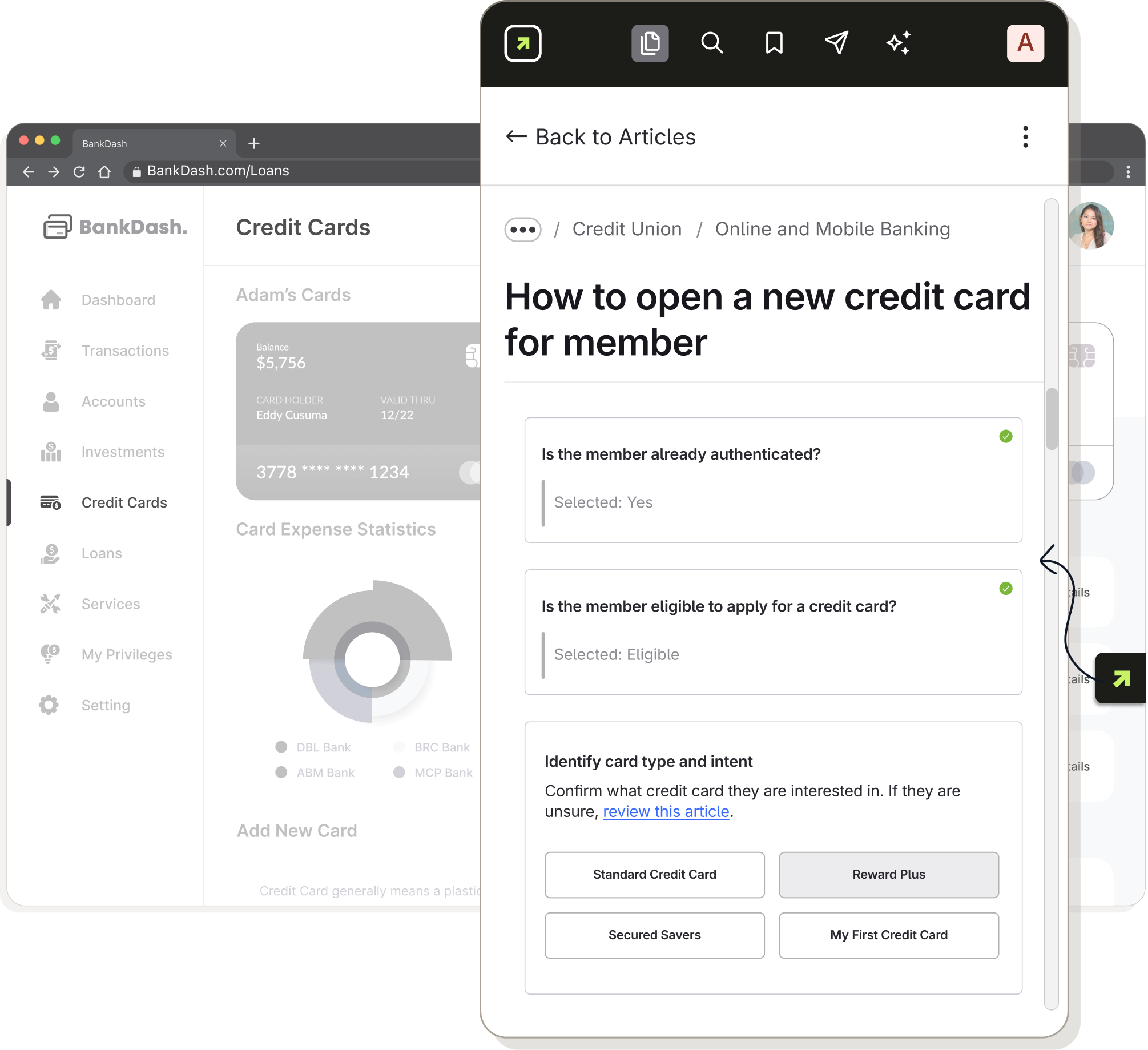
Introduced ScreenSteps Sidekick to deliver answers where work happens

With the ScreenSteps Sidekick browser extension, employees can search their knowledge base directly from their browser while working in their core systems.

When questions come up, the correct guidance is available immediately without leaving the workflow or placing a member on hold.

By centralizing SOPs, optimizing documentation, and delivering trusted answers directly within daily workflows, Fort Community ensured that every employee had access to the same reliable guidance.

ScreenSteps Sidekick Browser Extension

“We needed a place people could go to find answers while they’re helping someone. Now they can search for it and get what they need right away.”

Jennifer Tucker
Training Coordinator, Fort Community Credit Union

The Results

“Before Calling Someone, Check ScreenSteps.”

As ScreenSteps became part of daily workflows, expectations across the credit union began to shift.

Instead of picking up the phone when a question comes up, employees are encouraged to search ScreenSteps first.

The message is clear: Before calling someone, check ScreenSteps.

If the answer doesn’t exist in ScreenSteps, they can submit an article request, creating a clear line of communication between frontline employees and SMEs.

With procedures centralized and Sidekick delivering answers in the moment of need, employees now have a clear place to go for trusted guidance. That shift has helped Fort Community:

Create more consistent experiences across all five branches

Reduce confusion around how tasks and requests should be handled

Decrease reliance on one-off explanations and informal workarounds

Capture knowledge that might otherwise live in someone’s head

Most importantly, employees are building the habit of searching first. Answers are consistent. Updates can be made once and reflected everywhere.

For a multi-branch credit union, that consistency supports both member experience and operational confidence.

Say Goodbye to Tribal Knowledge and Hello to Guided Knowledge

Learn how you can support confident and consistent staff with trusted answers. 

Get a Demo icon-arrow-right-2

Watch Platform Overview

Discover the Knowledge Ops Platform in an overview video by Head of Implementation Jonathan DeVore.

Watch Now icon-arrow-right-2

Explore Learning Center

Get tips, insights, and best practices for better employee training and performance support.

Explore icon-arrow-right-2